Monitoring Profile: Frequency
| 1. | In the Monitoring Frequency field, click the Current Time Settings drop-down list and select the applicable frequency (for example, every 30 seconds, every minute and so forth). |
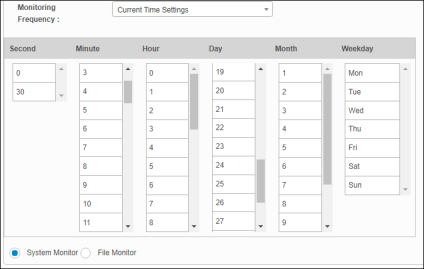
| 2. | Check to select the required Time (Second, Minute, Hour) and Date (Day, Month, Weekday) for scan functionality. |
| 3. | Click the options to be monitored, either System or File. |
| 4. | Click the links below to complete the other sections on this window. |
| 5. | When all selections/entries are made, click Add. |
| If required information is missing (such as the monitoring frequency), an Alert Message displays. Resolve the error and then attempt to add or save the information again. |
Related Topics