Configuring Juniper Mist Credentials
Juniper Mist credentials are created through the same New Credentials form used for every other credential type, under Admin > Credentials. There is no separate Mist-specific form.
Unlike scoped connectors, the Mist credential does not store an Organization ID or a Site selection. Every Organization and Site the token can access is discovered automatically whenever the credential is used, in a manual import or a scheduled import.
Credential Fields
| Field | Description |
|---|---|
| Name | A unique display name to identify this credential in Virima (e.g., mist1, mist-prod). This is required. |
| Credential Type | Select Juniper Mist from the dropdown. This is required. |
| End Point | The Mist regional API endpoint. Used as the base URL for all Mist API requests (e.g., https://api.mist.com). This is required. |
| API Key | The API token generated in the Mist portal, used to authenticate all API requests. Masked by default; check Show API Key to display it in plain text. Stored securely. This is required. |
| Active | This option keeps the credential active. This setting is optional. If you clear this option and save the changes, the credential is disabled without being deleted. The credential is removed from the Credential drop-down list in the import dialog, and any schedules associated with it stop running until the credential is re-enabled. |
Note: The Mist credential intentionally omits any Organization ID or Site selection. Import scope is derived entirely from what the API token can access.
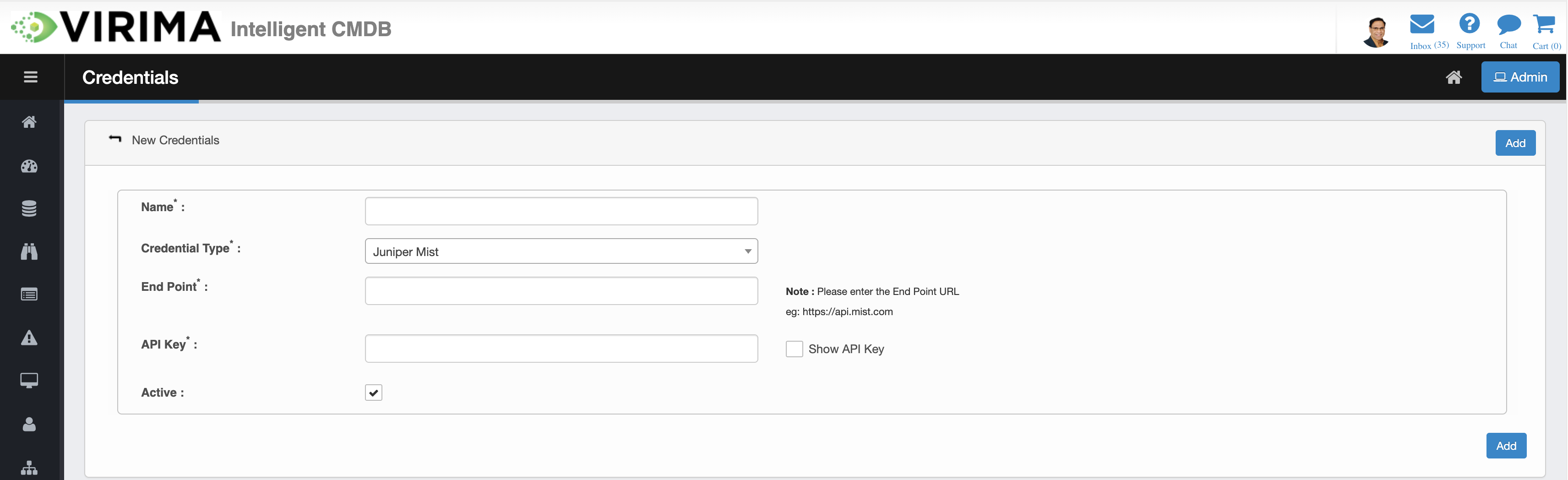
Adding a Juniper Mist Credential
-
Navigate to Admin > Credentials and choose New Credentials (or Select Actions > Add).
-
Enter the Name and set Credential Type to Juniper Mist.
-
Enter the End Point and the API Key. Use Show API Key to verify the value if needed.
-
Ensure Active is checked.
-
Click Add. Virima validates the credential against the Mist Cloud API. On success, a confirmation message is shown and the credential is saved.
When you save the credential, Virima immediately validates it against the Mist Cloud API:
-
An invalid key shows "Invalid API Token."
-
Any other rejection from Mist shows "Please check your Juniper Mist credentials."
-
If the Mist API endpoint cannot be reached, Virima shows "Unable to connect to Mist API endpoint."
-
Any required field left empty blocks submission and the missing field is highlighted.
Note: Juniper Mist is a cloud-API-only integration. Unlike agent-based discovery types, a Juniper Mist credential is never pushed down to a Discovery Application or agent.
Related Topics