Viewing Vulnerability Management
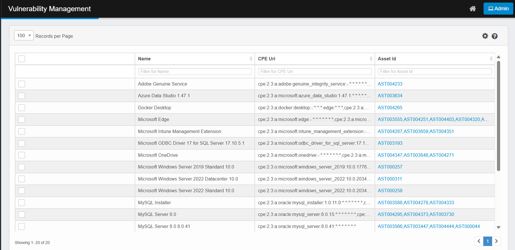
Upon accessing the module, you see the main grid, which provides an overview of all tracked vulnerabilities:
Column Details:
-
Name: Software or product name.
-
CPE Uri: Standardized identifier (Common Platform Enumeration).
-
Asset ID: One or more linked CMDB assets (clickable for details).
Viewing a Product
-
Use the Name filter to search for a specific product (e.g., Adobe Genuine Service, MySQL Server 8.0).
-
Alternatively, filter by CPE Uri or Asset ID.
Software Versions
-
Click the Name of the desired product in the Vulnerability Management page.
-
This opens the Software/Product Version View, listing:
-
CPE Uri for each version.
-
Title (version description).
-
One row per version known in the NVD.
-
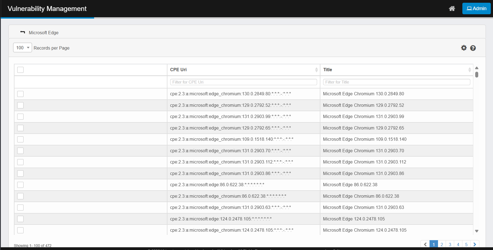
If a product has only a single version listed, clicking on the product name will take you directly to the list of associated CVEs for that version.
CVEs for a Specific Version
-
Open the Version’s Vulnerability List
-
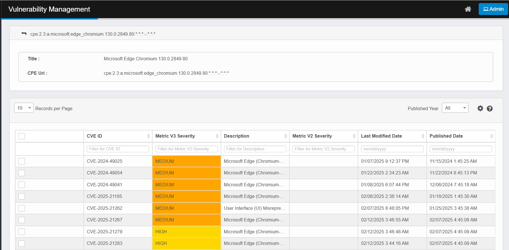
Click a version row to view its associated CVEs.
-
-
Vulnerability Details List
-
Title: The version description of a software/product.
-
CPE URI: Common Platform Enumeration Uniform Resource Identifier uniquely identifies software products, their versions, and sometimes their platforms or vendors.
-
CVE ID: CVE ID (Common Vulnerabilities and Exposures Identifier) is a unique identifier assigned to a specific security vulnerability.
-
Metric V2 Severity and Metric V3 Severity: Color-coded Severity,
-
HIGH = yellow
-
MEDIUM = orange
-
Critical = Red
-
Low = Green
-
-
Description: Description of the vulnerability.
-
Last Modified Date: The date the vulnerability (CVE) first appeared publicly in the National Vulnerability Database (NVD), marking its initial disclosure to the public and security community.
-
Published Date: The most recent date when any information about the vulnerability was updated in the NVD.
-
You can filter vulnerabilities by their published year using the Published Year dropdown. This allows you to quickly view vulnerabilities that were published in a specific year.
-
-
-
View Full CVE Details
-
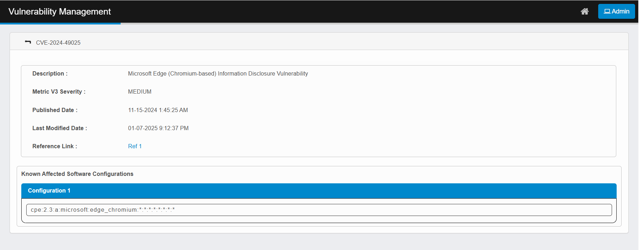
Click the CVE ID to see:
-
Full description.
-
Reference links.
-
Known affected software configurations.
-
Reference Links: External resources for remediation.
-
-
See Which Assets Are Affected
You can identify impacted assets (CIs) in two ways:
Option 1 — From the Vulnerability page
-
Click the Asset ID link for a product in the main page.
-
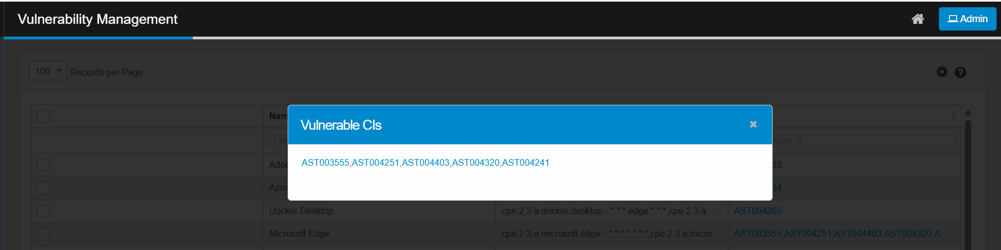
A Vulnerable CIs pop-up appears. Click a CI (e.g., AST003555) to open the asset in the CMDB.
-
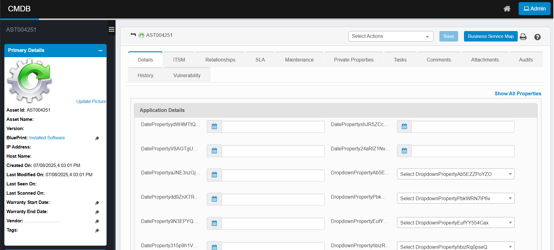
Click the Asset ID link to be redirected to the corresponding asset’s detail page in the CMDB.
-
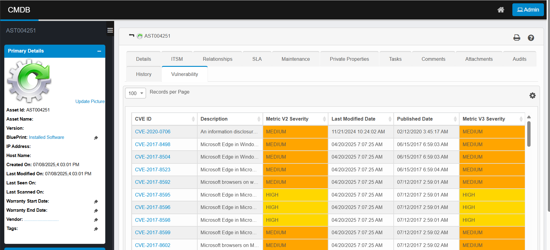
Click the Vulnerability tab to display the list of vulnerabilities associated with the asset.
-
Click a CVE ID for full details as described above.
Option 2 — From the CMDB
-
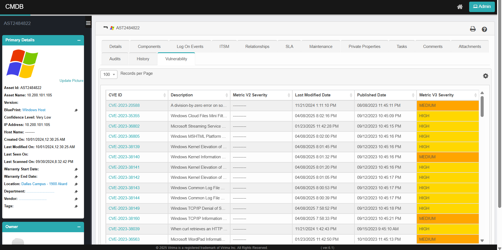
Go to CMDB and open the desired asset record.
-
Click the Vulnerability tab to view:
-
A list of CVE IDs affecting the asset.
-
Descriptions, V2/V3 severities (color-coded), published and last modified dates.
-
Click a CVE ID for full details as described above.
-
-
When a Configuration Item (CI) is deleted from the CMDB—whether it is a main (top-level) asset or a component asset—all associated records for that CI in the Vulnerability Management module are also automatically deleted. This ensures that vulnerability data remains consistent and does not reference assets that no longer exist in the CMDB.
When searching for an Asset ID in the CMDB, it’s important to understand the distinction between main assets and components:
-
If the Asset ID belongs to a component (rather than a main asset), it will not appear in the main CMDB asset list and cannot be searched directly from the primary CMDB search interface.
-
Components are not listed as primary assets in the CMDB search results. Only main (top-level) assets are searchable and visible in the main asset grid.
Option 3- From the BSM View
-
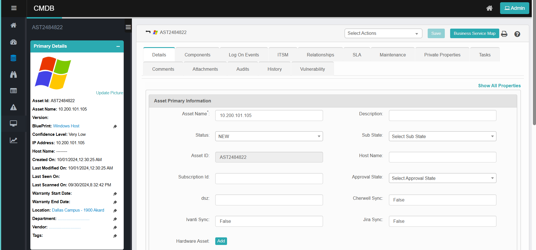
Go to CMDB and open the desired asset record.
-
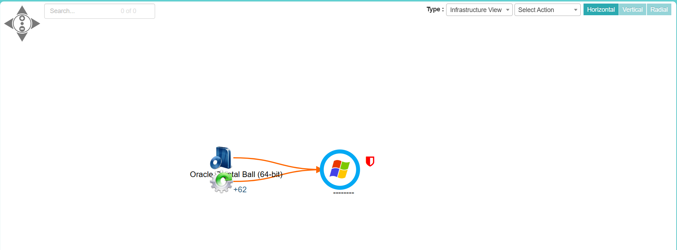
Click Business Service Map to open the BSM view.
-
Right-click the vulnerability icon and select "Vulnerability Information" to view detailed vulnerability information. The system will redirect you to the Vulnerability Version page. From there, clicking on a specific version will display the list of vulnerabilities associated with the selected Configuration Item (CI).
-
If a vulnerability is present for a particular Configuration Item (CI), a vulnerability icon will be added to that CI’s record.
-
Additionally, if any child CI within a hierarchy has a vulnerability, the vulnerability icon will also be displayed on both the parent and the affected child CIs.