New Risk Register
Use this function to add a new risk register item.
| 1. | From the navigation pane, select Risk Register > Risks. The Risks window displays. |

| 2. | From the Select Actions drop-down list, choose New Risk. The Risks window displays. |
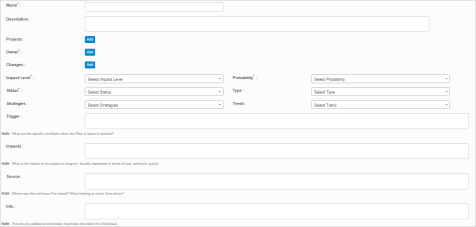
| 3. | Complete the fields referring to the table below. |
| 4. | When all selections/entries are made, click Add. |
Risk Register Fields
| Field | Description |
|---|---|
| Name | Generic name for this risk. |
| Description | Information that describes this risk. |
|
Projects |
The project to associate with the risk. Click Add... |
|
Owner |
An individual responsible for ensuring that risks are appropriately engaged with countermeasures undertaken. Click Add... |
|
Changes |
The change to associate with the risk. Click Add... |
|
Impact Level |
Provides an assessment of the impact that the occurrence of this risk would have on the project/change. Options include Very Low, Low, Medium, High, and Very High. |
|
Probability |
Provides an extent on how likely this risk will occur. Options include Very Low, Low, Medium, High, Very High, Issue and Blocker. |
|
Status |
Indicates the current state of a risk. The statuses of risks are New, Planning, Action, Pending, Resolved, Deferred and Deleted. |
|
Type |
Risks are classified into different categories based on the potential impacts like Customer, External customer, Management, Organization and Technical risks. |
|
Strategies |
Actions to be taken to avoid, mitigate, accept, or transfer the risk. |
|
Trend |
Provides an analysis on whether the risk is going to be Static, Decreasing or Increasing. |
|
Trigger |
Indicates the specific conditions when this Risk or Issue is realized. |
|
Impacts |
Indicates the impact to the project or program. Usually expressed in terms of cost, schedule and quality. |
|
Source |
Provides information about from where and how this risk/issue was first raised. |
|
Info |
Additional information that helps in describing the risk is documented. |