New Vendor Management
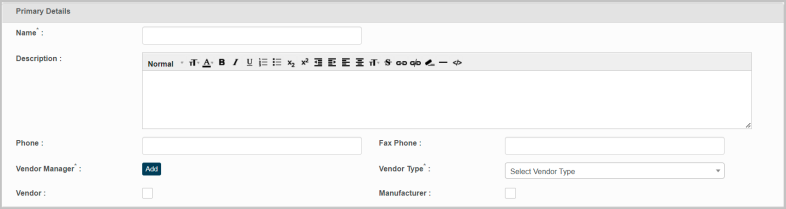
This feature enables to enter complete information of the vendor in the application.
Primary Details:
|
1.
|
Enter the name of the vendor in the Name box. |
|
2.
|
Enter additional and or complete information of the vendor in the Description box. |
|
3.
|
Enter the phone number of the vendor in the Phone box. |
|
4.
|
Enter the fax number of the vendor in the Fax box. |
|
5.
|
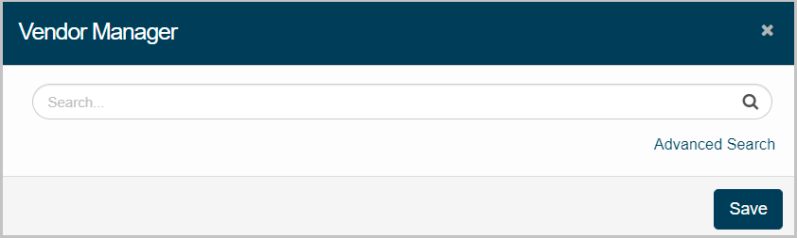
Click Add to select, and update Vendor Manager. |
Vendor Manager window displays:
|
1.
|
Enter the search criteria in the given text box, and then click ?? |
Results are displayed based on the search criteria:
|
1.
|
Select the required vendor, and then click Save. |
|
2.
|
Select the required type of the vendor from the Vendor Type drop down. |
|
4.
|
Check Manufacturer option if the corresponding Vendor is a manufacturer of the product as well. |
Record Details:
|
1.
|
Select name of the vendor company residing country from the Country drop down. |
|
2.
|
Select name of the vendor residing state/province of the corresponding country from the State/Province dropdown. |
|
3.
|
Enter the name of the vendor residing city in the City box. |
|
4.
|
Enter street number or name of the corresponding city in the Street box. |
|
5.
|
Enter postal code of the entered city name in the Zip/Postal Code. |
|
6.
|
Enter website address/URL of the vendor company in the Website box. |
|
7.
|
Enter geographical details of the vendor company in the Latitude, and Longitude box. |
|
8.
|
Enter a symbol representing vendor's stock in the Stock Symbol box. |
Financial Details
|
1.
|
Enter total profit gained by the vendor for the financial year in the Profit($) box expressed in US Dollars. |
|
2.
|
Enter the price of the vendor company stock price in the Stock Price($) box expressed in US Dollars. |
|
3.
|
Enter the total number of employees present in the vendor's company in the Number of Employees box. |
|
4.
|
Enter details of trading performed by the vendor publicly in the Publicly Traded box. |
|
5.
|
Enter total revenue generated by the vendor company in the Revenue per Year($) box. |
|
6.
|
Enter market value of the vendor traded its outstanding shares in the Market Cap($) box. |
Note: It is equal to the share price multiplied by the number of shares outstanding.
|
7.
|
Click Add to update Vendor Management details in the application. |