New Software License Key
Delete this text and replace it with your own content.
| 1. | From the navigation pane, select ITAM > Software Asset Management > Software License Keys. The Software License Keys window displays. |
| 2. | From the Select Actions drop-down list, choose New. The Software License Key dialog box displays. |
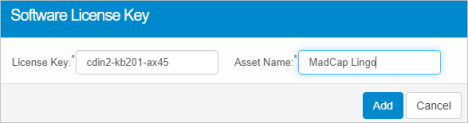
| 3. | In the License Key field, enter the license key. |
| 4. | In the Asset Name field, enter the name of the software for which the key applies. |
| 5. | Click Add. |
Related Topics