New Certificate Management
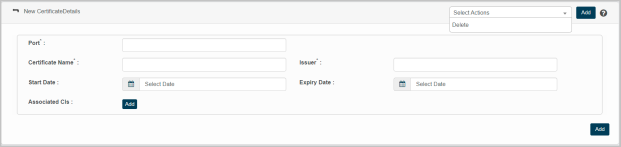
This feature enables to configure certificate license details by entering values for the parameters given in the application page.
|
1.
|
Choose New Certificate Details option from Select Actions drop-down. The New Certificate Details page displays. |
|
2.
|
Enter the IP address of the software /hardware for which certificate details to be configured in the IP Address. |
|
3.
|
Enter the name of the software /hardware installed host in the Host Name. |
|
4.
|
Enter software / hardware installed host type in the Host Type box. |
|
5.
|
Enter the name of the host type operating system in the OS box. |
|
6.
|
Enter the name of the certificate configured for the corresponding software /hardware in the Certificate Name box. |
|
7.
|
Enter the location of the configured /saved certificate in the path box. |
|
8.
|
Enter the name of the company /issuer of the corresponding certificate in the Issuer box. |
|
9.
|
Click Start Date, and Expiry Date text box to select the duration of the certificate accordingly. |
|
10.
|
Click Add to update CI(s) to be associated with the corresponding certificate. |
|
11.
|
Click Add to add update configured Certificate Details in the application. |
Instructions For Add:
|
1.
|
Enter the search criteria in the given text box, and then click Search icon. |
|
2.
|
The results are displayed as per the given search criteria. |
|
3.
|
Select a required value, and then click Save. |
|
4.
|
Click Cancel to discard the action, and in continuation no value will be selected. |