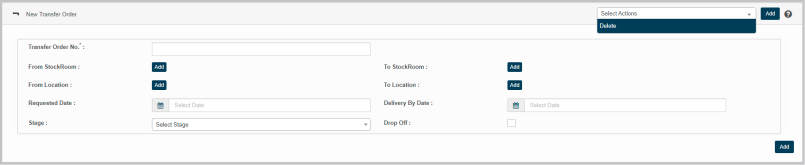
New Transfer Order
This feature enables the creation of transfer order details in the application as per the given parameters.
|
1.
|
Select New Transfer Order option from Select Actions dropdown. The New Transfer Order page displays. |
|
2.
|
Enter number to be assigned for transfer order in the Transfer Order No. box. |
|
3.
|
Click Add to update details of the following parameters: |
Instructions
|
a.
|
Enter the search criteria in the given text box, and then click search icon. |
|
b.
|
The results are displayed as per the given search criteria. |
|
c.
|
Select a required value, and then click Save. |
|
d.
|
Click Cancel to discard the action, and in continuation no value will be selected. |
Reference : Click the link for https://wiki.virima.com/wiki/doku.php?id=advanced_search_page for Advanced Search instructions
|
4.
|
Click Requested Date to select the date of transfer order requisition. |
|
5.
|
Click Delivery Date to select the date of delivery of assets to mentioned To Stockroom present into Location. |
|
6.
|
Check Drop Off option to decline the corresponding Transfer Order. |