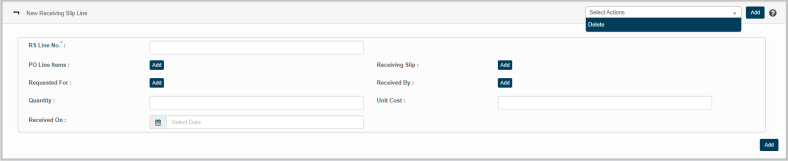
New Receiving Slip Line
This feature enables enter details of the receiving slip in the application by entering values for the given parameters.
|
1.
|
Select New Receiving Slip Line option from Select Actions dropdown. The New Receiving Slip Line page displays. |
|
2.
|
Enter RS Line No. in the given text box. |
|
3.
|
Click Add to update values for the following parameters: |
Instructions
|
a.
|
Enter the search criteria in the given text box, and then click the search icon. |
|
b.
|
The results are displayed as per the given search criteria. |
|
c.
|
Select a required value, and then click Save. |
|
d.
|
Click Cancel to discard the action, and in continuation no value will be selected. |
Reference : Click the link for https://wiki.virima.com/wiki/doku.php?id=advanced_search_page for Advanced Search instructions
|
4.
|
Enter the total quantity of the asset in the Quantity box |
|
5.
|
Enter cost of each asset unit in the Unit Cost box |
|
6.
|
Click Received On text box to update date of RS Line |
|
7.
|
Click Add to update Receiving Slip Line details in the application |