History of Scheduled Scan Execution
-
In Scheduled Scans and Imports page
-
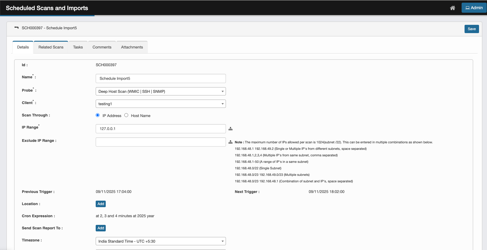
Click on the schedule ID.

-
Will open the schedule in edit mode
-
Displays the details of the scheduled job
-
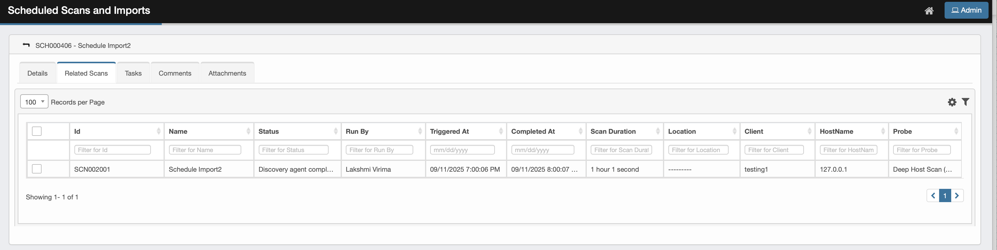
Click on Related Scans tab.
-
A row is displayed for every scan execution.
-
Displayed information
-
Fields populated while scheduling a Scan
-
Id, Name, Location, Client, HostName, Probe.
-
-
Fields providing details of the run
-
Status: Indicates success or failure of the Scan
-
Run By: Login details of scheduled scan
-
Triggered At - Timestamp of scan start
-
Completed At - Timestamp when scan completed
-
Duration - Total time from scan start to finish in
-
-
-
Use column filters to find a particular scan.
-
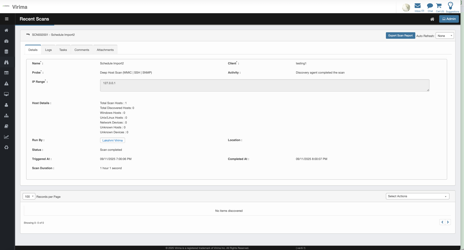
Click on Scan ID or any other field to see details of the scan.
-
Upon Click user is redirected to Recent Scans Page with details of the scan.
-
-
Refer to Recent Scans Page document to understand the details on this Page
-
Previous Trigger – last time this schedule fired (after your first run).
-
Next Trigger – when it will fire next (updates as soon as you save or change timezone/wheels).