Exporting a Scan
-
(Optional) Filter the grid or Select specific row(s) to export.
-
If specific scans are selected
-
Exported file will contain only selected row.
-
-
If no rows are selected
-
All scan schedules are exported.
-
-
-
Click Select Actions → Export.
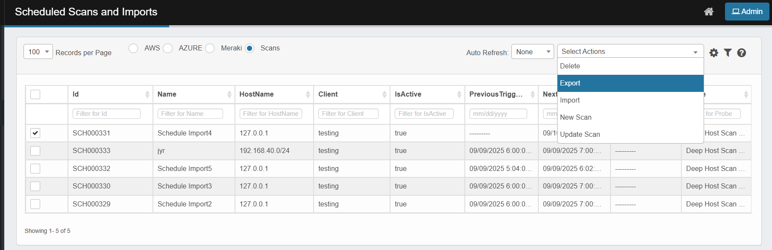
-
An excel file is downloaded with following column headers

-
Id is the last three digits of the Schedule ID
-
IsActive indicates if the schedule is active (true) or not(false)
-
NextTriggerTime, if Schedule is active
-
Client is discovery application name this schedule is applicable to
-
Probe is the probe to be executed when the scan is triggered
-
Name of the scan
-
PreviousTriggertime the last scan execution time, will be blank if the scan is triggered first time or not triggered at all
-
Credential: Applicable for Meraki, AWS, Azure import only