Bulk Update Scan
-
In Scans (radio button selected), Select one or more job
-
Click on “Select Actions” and select “Update Scan”
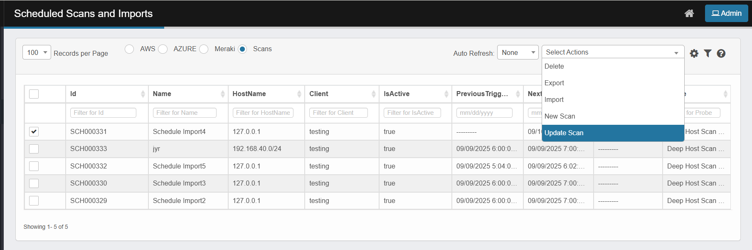
-
Limited set of attributes, common to all selected scans, that is not scan specific is displayed
-
Client: pick the target client you want the selected scans to run on
-
Scan Frequency: choose the frequency preset (e.g., Current Time Settings) you want to apply.
-
Recurring: select Yes or No.
-
Time Zone: choose the correct timezone.
-
Active: select Yes (to run) or No (to pause).
-
Schedule wheels: tick the box above each wheel you want to control (Second / Minute / Hour / Day / Month / Weekday), then set the values with the pickers.
-
-
Click Update.
-
Updated details shall reflect in all the selected checkbox(es)