Import from Meraki
Use this function to import Meraki devices such as Access Points, Switches, Firewalls, and Routers, which can be managed inside the Meraki dashboard.
|
1.
|
In the navigation pane, select Discovery Scan > Import from Meraki. The Import from Meraki window displays. |
|
2.
|
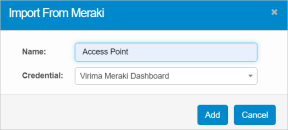
From the Select Actions drop-down list, choose Import. The Import From Meraki dialog box displays. |
|
4.
|
In the Credential field, click the drop-down list, and select the applicable Meraki credential. |
|
5.
|
When all selections/entries are made, click Add. |
 Edit Import from Meraki
Use this function to edit the values of the configured parameters and update the information in the application.
|
1.
|
In the navigation pane, select Discovery Scan > Import from Meraki. |
|
2.
|
Select the record to edit. The Edit Report window displays the configured details into the following categories: All, Authorized, and Unauthorized. |
Authorized represents all assets that are already present inside CMDB.
Unauthorized represents new assets.
|
3.
|
Click the Log tab to view all activity related to this import including issues discovered. |
|
4.
|
To move a record CMDB, do the following: |
|
c.
|
In the Alert Message window, click Continue to move the record. The process runs in the background and no further action is required. |
Delete Import from Meraki
| |
Deleting is a permanent action and cannot be undone. Deleting may affect other functionality and information in the application such as data in configured reports, fields in windows, selectable options, etc. Therefore, be sure to understand the potential effects before making a deletion. |
|
1.
|
Click the line that contains the item to delete. |
|
2.
|
From the Select Actions drop-down list, choose Delete. If a confirmation message is displayed, type Delete and click Deleteto confirm. |
Other Functions and Page Elements