Accessing the Import AZURE Window
-
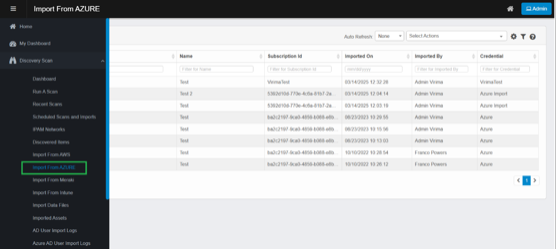
In the navigation pane, select Discovery Scan › Import from AZURE.
-
The Import From AZURE window appears, displaying any records you've already imported.
-
Import From AZURE page opens.
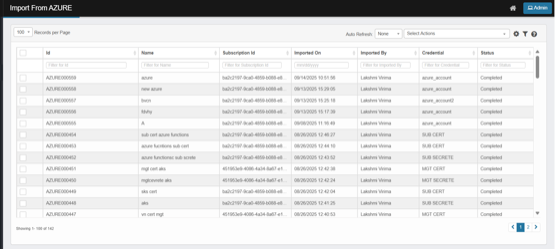
The page displays a list of imported runs from your AZURE accounts. Each row represents a single import run.
-
Key columns:
-
Id: Unique identification ID of the import run (e.g., AZURE000559), records imported from AZURE will have the prefix “AZURE” followed by a six-digit sequential number.
-
Name:
-
Manual Import: The user provided name used to identify the import run.
-
Scheduled imports: The user-provided schedule name appears under the "Name" column.
-
-
Subscription Id: “Subscription Id" column displays the value entered for either a Subscription Id or a Management Group Id when adding Azure credentials.
-
Imported On: The date and time when the import was completed.
-
Status: Current state (e.g., Importing, Completed, Failed).
-
Importing: The import process from AZURE is currently running and in progress.
-
Completed: The import from AZURE has finished successfully.
-
Failed: The import has failed, for example due to unknown erros.
-
Note: Please contact support to get the failure logs.
-
-
-
Imported By:
-
Manual Import: The logged-in user who initiated a manual import.
-
Scheduled Import: The logged-in user who configured scheduled import.
-
-
Credential: Virima credential profile used to connect to AZURE.
-
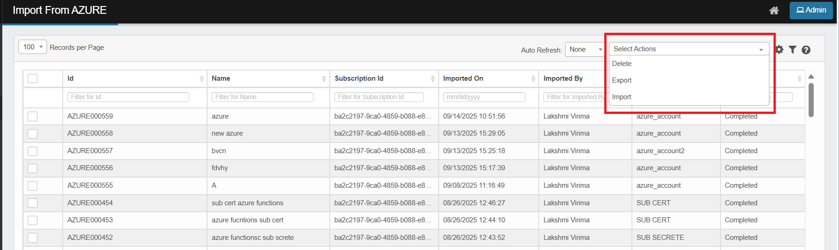
Select Actions: Perform bulk operations on selected or filtered rows.
-
-
From the Select Actions drop-down list, choose the operation you want to perform.
-
Delete: Remove selected import record
-
Selected import record(s) will be deleted.
-
CI(s) imported during the selected import will be removed from Discovered Items.
-
CI(s) moved to CMDB will still appear under CMDB after deleting the AZURE import record.
-
-
Export – Download grid contents (selected or filtered rows) to Excel.
-
If you have selected rows, only the selected rows are exported.
-
If you have applied filters, all rows that match the current filters are exported.
-
If no filters are applied and no rows are selected, exporting will include all records from all pages.
-
The file includes the grid columns (e.g., Unique ID, Subscription Id, Credential, Imported By, Name, and Imported On.) (Refer Exported Excel Column Details)
-
This downloads the import records NOT the CI(s).
-
Import – Initiate a new Import from AZURE.