Accessing the Import AWS Window
Use this procedure to view and manage imported AWS resource metadata in Virima.
-
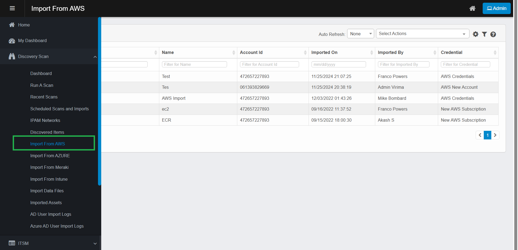
In the left navigation pane, expand Discovery Scan.
-
Select Import From AWS.
-
Import From AWS page opens.
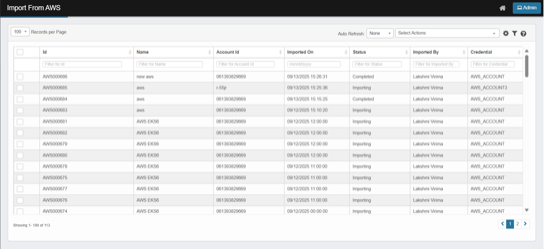
The page displays a list of imported runs from your AWS accounts. Each row represents a single import run.
-
Key columns:
-
Id: Unique identification ID of the import run (e.g., AWS000686), records imported from AWS will have the prefix “AWS” followed by a six-digit sequential number.
-
Name:
-
Manual Import: The user provided name used to identify the import run.
-
Scheduled imports: The user-provided schedule name appears under the "Name" column.
-
-
Account Id: While adding credentials for AWS account configuration, regardless of the credential type selected (Account Id, Organization Unit Id, or Root Id), the value entered will always be displayed in the "Account Id" column.
-
Imported On: The date and time when the import was completed.
-
Status: Current state (e.g., Importing, Completed, Failed).
-
Importing: The import process from AWS is currently running and in progress.
-
Completed: The import from AWS has finished successfully.
-
Failed: The import has failed, due to some unknown errors.
-
View failure details from the AWS logs.
-
-
-
Imported By:
-
Manual Import: The logged-in user who initiated a manual import.
-
Scheduled Import: The logged-in user who configured scheduled import.
-
-
Credential: Virima credential profile used to connect to AWS.
-
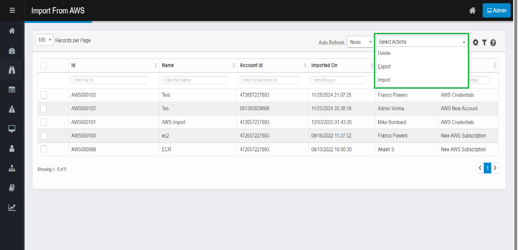
Select Actions: Perform bulk operations on selected or filtered rows.
-
-
From the Select Actions drop-down list, choose the operation you want to perform.
-
Delete: Remove selected import record
-
Selected import record(s) shall be deleted
-
CI(s) imported during the selected import shall be removed from Discovered Items
-
CI(s) moved to CMDB will still appear under CMDB after deleting the AWS import record.
-
-
Export – Download grid contents (selected or filtered rows) to Excel.
-
If you have selected rows, only the selected rows are exported.
-
If you have applied filters, all rows that match the current filters are exported.
-
If no filters are applied and no rows are selected, exporting will include all records from all pages.
-
The file includes the grid columns (e.g., Unique ID, Account Id, Credential, Imported By, Name, and Imported On.) (Refer Exported Excel Colum Details)
-
This downloads the import records NOT the CI(s).
-
Import – Initiate a new Import from AWS.