Unauthorized Tab
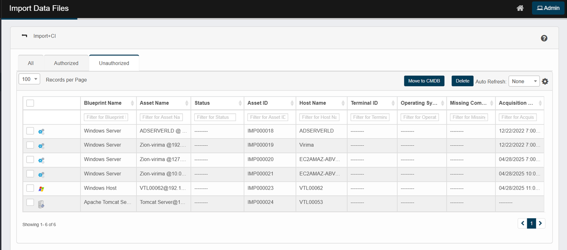
Lists new records that do not currently exist in the CMDB. These will be added as new CIs once approved.
-
Action Buttons:
-
"Move to CMDB" (to approve and move assets into the CMDB)
-
"Delete" (to remove selected assets)
-
-
Click any unauthorized CI to view details of the imported assets.
Layout and Sections
-
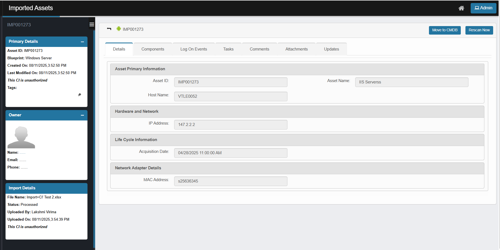
Left Sidebar
-
Primary Details: Shows key identifiers and metadata for the asset, including:
-
Asset ID (e.g., IMP001273)
-
Blueprint (e.g., Windows Server)
-
Created On and Last Modified On timestamps
-
Authorization status – A badge indicating This CI is unauthorized:
-
Unauthorized = the CI is new or not yet moved to CMDB; typically surfaced from the Unauthorized tab in import views.
-
-
Tags if any (with an editable pencil icon)
-
-
Owner: The system assigns the logged-in user as the CI owner when importing a CI.
-
Import Details: Information about the import process, such as:
-
File Name (e.g., Import+CI's.xlsx)
-
Status (e.g., Processed)
-
Uploaded By (e.g., Lakshmi Virima)
-
Uploaded On (timestamp)
-
Authorization status – A badge indicating This CI is unauthorized.
-
-
Main Content Area
-
Header: Displays the asset identifier (e.g., IMP001273).
-
Action Buttons:
-
Move to CMDB (to promote the asset to the CMDB)
-
Rescan Now (to trigger a new scan of the asset)
-
-
Tabbed Navigation: Provides access to different information categories:
-
Details (active tab)
-
Components
-
Log On Events
-
Tasks
-
Comments
-
Attachments
-
Updates
-
-
Details Tab (Main Content)
-
Asset Primary Information
-
Asset ID – the imported ID (IMP prefix).
-
Asset Name – Asset name from the file.
-
Host Name – The hostname of the asset.
-
-
Hardware and Network
-
IP Address – last/primary IP from the import.
-
-
Life Cycle Information
-
Acquisition Date – date/time of acquisition provided during import.
-
-
Network Adapter Details
-
MAC Address – network adapter MAC captured in the import.
-