Authorized Tab
-
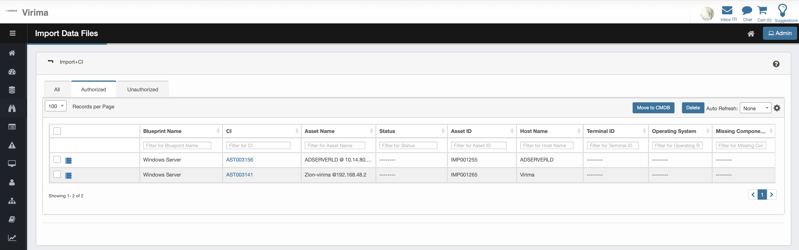
Shows CI(s) that match existing entries in the CMDB - Correlator Match.
-
Fields in this view:
-
Blueprint Name: Name of the Blueprint.
-
CI: CMDB CI ID matching the imported CI.
-
Asset Name: Provided Asset name.
-
Asset ID: New Asset ID is created with prefix of “IMP” to denote that this record was imported. The format is “IMP” + 6 digits (auto generated sequential number.
-
Status: Indicates the current status of the imported asset.
-
What it is: CI lifecycle state (e.g., In Use, Retired, Decommissioned).
-
Where it comes from: The Status dropdown is driven by Admin → SACM → CMDB Properties → Status. The same picklist is used by Business Rules.
-
-
Host Name: The hostname of the asset or device.
-
Terminal ID: Optional, stored exactly as provided; not used for correlation unless your blueprint explicitly defines it.
-
Operating System: The operating system detected or specified for the asset.
-
Missing Components: Lists any components that are missing from the imported asset.
-
Missing Components: Not applicable for Imported Items. We don’t import component lists, so this field is left blank (or treated as N/A) on import. It will only be evaluated after a CI is moved to CMDB and the Process-Missing-Components job runs.
-
-
-
Click any CI to view details of the imported assets other than the hyperlinked column under CI column.
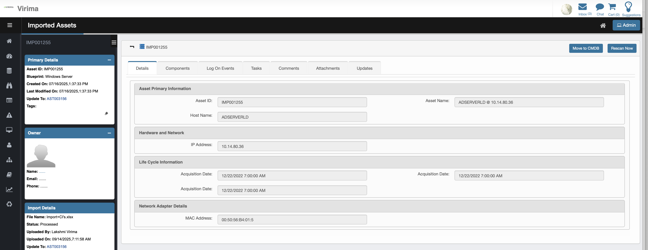
Layout and Sections
-
Left Sidebar
-
Primary Details: Shows key identifiers and metadata for the asset, including:
-
Asset ID (e.g., IMP001255)
-
Blueprint (e.g., Windows Server)
-
Created On and Last Modified On timestamps
-
Update To (which refers to the Asset ID from CMDB associated with this record).
-
Tags if any (with an editable pencil icon)
-
-
Owner: The system assigns the logged-in user as the CI owner when importing a CI.
-
Import Details: Information about the import process, such as:
-
File Name (e.g., Import+CI's.xlsx)
-
Status (e.g., Processed)
-
Uploaded By (e.g., Lakshmi Virima)
-
Uploaded On (timestamp)
-
Update To (again referencing AST003156)
-
-
Main Content Area
-
Header: Displays the asset identifier (e.g., IMP001255).
-
Action Buttons:
-
Move to CMDB (to promote the asset to the configuration database)
-
Rescan Now (to trigger a new scan of the asset)
-
-
Tabbed Navigation: Provides access to different information categories:
-
Details (active tab)
-
Components
-
Log On Events
-
Tasks
-
Comments
-
Attachments
-
Updates
-
-
Details Tab (Main Content)
-
Asset Primary Information:
-
Asset ID, Host Name, Asset Name
-
-
Hardware and Network:
-
IP Address
-
-
Life Cycle Information:
-
Acquisition Date (repeated, possibly for multiple records or a display issue)
-
-
Network Adapter Details:
-
MAC Address
-