All Tab
-
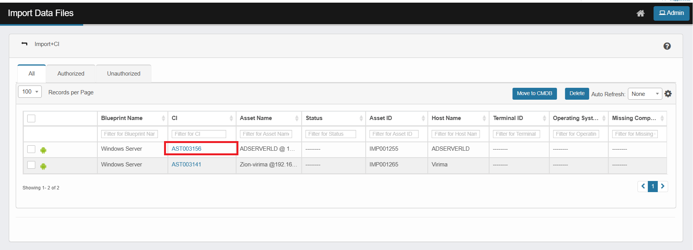
Displays every record included in the imported file, regardless of whether it matches an existing CI or is a new CI.
-
Blueprint Name: Name of the Blueprint
-
CI: CMDB CI ID matching the imported CI
-
Asset Name: The name of the asset as recognized in the import file or system.
-
Asset ID: New Asset ID is created with prefix of “IMP” to denote that this record was imported. The format is “IMP” + 6 digits (auto generated sequential number).
-
-
Clicking the hyperlinked CI ID under CI column will display the corresponding record in CMDB.
-
If we click on any other column values regardless of whether CI exists in CMDB or not, the user is redirected to Imported Assets view to view the imported asset data.
Layout and Sections
-
Header bar
-
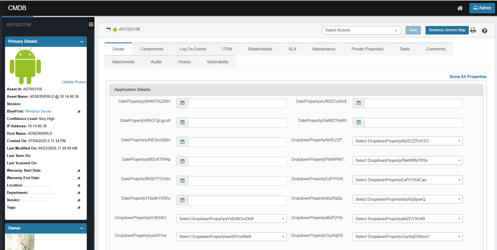
CI identifier and name at the top (e.g., AST001516).
-
Select Actions menu for record-level actions.
-
Business Service Map button (opens the service dependency map for this CI).
-
-
Tabs across the top
-
Details – the editable profile for the CI (core and custom fields).
-
Components – componentized items attached to the CI.
-
ITSM – quick access to incidents/requests/problems/changes/known errors/releases/knowledge tied to the CI.
-
Relationships – Shows connections between this CI and others
-
SLA – applicable service levels.
-
Maintenance – Schedule maintenance tasks for a CI, such as rebooting or running specific commands.
-
Private Properties configured private properties at the blueprint level for specific users with access.
-
Tasks – Tracks tasks or actions assigned to this CI
-
Comments – audit notes / collaboration thread.
-
History - Shows modification history, including timestamps and users
-
Vulnerability (if enabled) – Lists known vulnerabilities, threat severity, and risk details
-
-
Primary Details
-
Asset Id: The CMDB’s unique identifier for this CI (e.g., AST003156).
-
Asset Name: Provided Asset name; here it includes the host and IP (ADSERVERLD @ 10.14.80.36).
-
Version: Optional version/build of the asset or software (blank in the screenshot).
-
Blueprint: The blueprint associated (e.g., Windows Server).
-
Confidence Level: Data quality score from discovery/enrichment (e.g., Very High).
-
IP Address: Last known IP (e.g., 10.14.80.36).
-
Host Name: DNS/host name (e.g., ADSERVERLD).
-
Created On: When this CI was first created in CMDB.
-
Last Modified On: Most recent update to any field on this record.
-
Last Seen On: Last successful “sighting” in discovery (empty if not yet observed).
-
Last Scanned On: Timestamp of the most recent discovery scan for this CI (empty if not scanned).
-
Warranty Start Date / Warranty End Date: Warranty lifecycle dates (editable).
-
Location / Department / Vendor: Organizational metadata fields for ownership/placement (editable).
-
Tags: Free-form labels/metadata you can use for grouping, search, or policy (editable).
-
Update Picture: Upload/replace the icon shown for this asset.
-
-
Owner
-
Person card for the primary owner: Name, Email, Phone (with avatar); quick remove/edit where permitted.
-
-
Second Level Support / Third Level Support
-
Support group or contact cards with Name, Email, Phone. Used for routing escalations.
-
-
Manager
-
Manager contact card (Name/Email/Phone) tied to the CI or its owning team.
-
-
Related Records
-
Shortcuts (often with counts) to ITSM items associated to this CI:
-
Open Incidents, Open Requests, Open Problems
-
Open Known Errors, Releases, Open Knowledge
-
-
Clicking a link takes you to the filtered list for that record type with this CI pre-applied.
-