Accessing the Import Data Files Page
-
From the left navigation panel, navigate to Discovery Scan. Click Import Data Files.
-
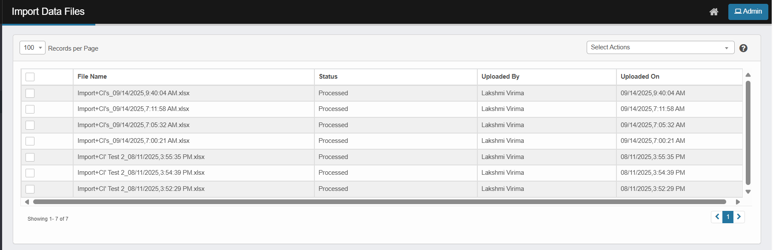
The Import Data Files page opens.
-
Display the list of uploaded files with these columns:
-
File Name – The name of the uploaded file.
-
Status – Indicates processing state (e.g., Processed, Processing).
-
Processing: The CI(s) in the uploaded file are currently being imported. (Import in Progress)
-
Processed: The system successfully imported the CIs from the uploaded file.
-
-
Uploaded By – Identifies the user who uploaded the file.
-
Uploaded On – The date and time when the file was uploaded.
-
-
Use the checkboxes to select one or more files for bulk actions.