Regular Scan
The Regular Scan section conducts a full network scan and manages the IP address ranges to include or exclude from the scan.
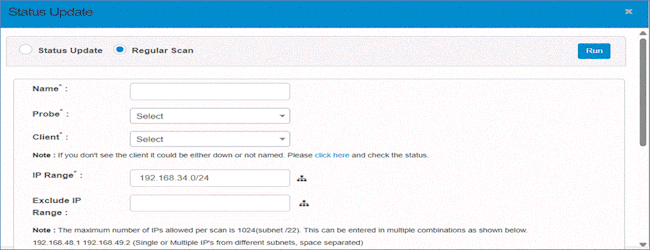
Fields and settings for configuring a Regular Scan:
-
Name: Provide a name for the scan.
-
Probe: Select the type of probe.
-
Client: Select the client to scan (ensure the client is operational).
-
IP Range: Specify the IP range to scan (e.g., 192.168.34.0/24).
-
Exclude IP Range: Define specific IP ranges to exclude from the scan.
-
The maximum number of IPs allowed per scan is 1024 (Subnet /22). You can enter IPs in various formats:
-
Single or multiple IPs from different subnets: e.g., 192.168.48.1 192.168.49.2.
-
Multiple IPs from the same subnet: e.g., 192.168.48.1,2,3,4.
-
A range of IPs in the same subnet: e.g., 192.168.48.1-50.
-
A single subnet: e.g., 192.168.48.0/22.
-
Multiple subnets: e.g., 192.168.48.0/23 192.168.49.0/23.
-
Combination of subnet and IPs: e.g., 192.168.48.0/23 192.168.48.1.
-
-
The total number of IPs should not exceed 1024.
-
-
Location (Optional): Specify the scan location.
-
Scan Type: Choose between Immediate or Scheduled scan.
-
Immediate: The scan starts immediately.
-
Scheduled: The scan runs at a scheduled time.
-
-
Send Scan Report To (Optional): Provide an email address for receiving scan results.
After the scan, details will appear in Recent Scans. Upon a successful scan, results will move to Discovered Items for further management.