Tabs for Extended Information
-
Tasks: Displays or allows creation of tasks linked to the import job.
-
Comments: Provides space for administrators to add notes or review remarks from others.
-
Attachments: Lets users upload or view related files, such as screenshots, reports, or documentation tied to the import.
Clicking on the "New User Count" will navigate you to the User Record page, where the Azure AD User Import Logs are automatically filtered and the relevant results are displayed.
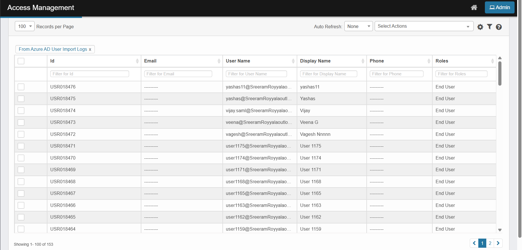
Key Information displayed:
-
Id: The unique identifier assigned to each user record.
-
Email: The email address associated with the user.
-
User Name: The Azure AD user’s principal name or login name.
-
Display Name: The display name of the user as shown in Azure AD.
-
Phone: The phone number associated with the user (empty in the current data).
-
Roles: The assigned role(s) for the user (e.g., End User).