Azure AD Configuration and Import
Azure Active Directory (Azure AD) is Microsoft's cloud-based identity and access management service. It authenticates and authorizes users and devices, manages user identities, and controls access to cloud and on-premises applications and resources.
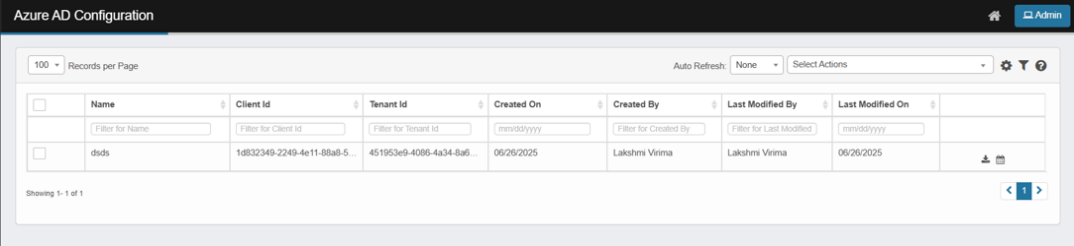
In the main window, click Admin > Users > Azure AD Configuration. The Azure AD Configuration window displays.
-
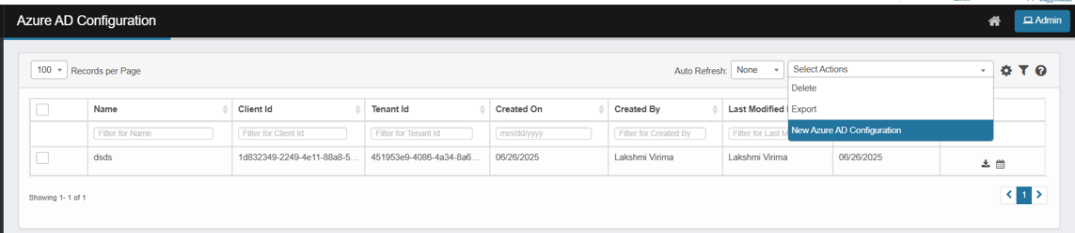
From the Select Actions drop-down list, choose New Azure AD Configuration.
-
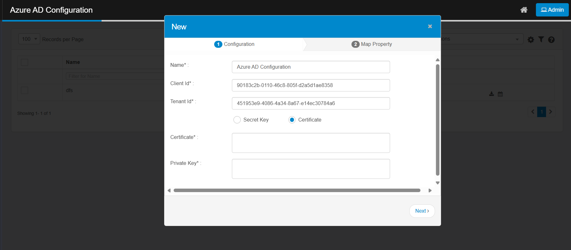
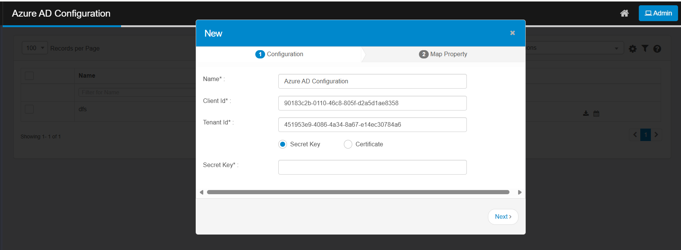
On the Configuration tab, fill in the values for the attributes.
-
Name – Provide a configuration name.
-
Client ID – Enter the Azure application client ID.
-
Tenant ID – Enter the Azure tenant ID.
-
Secret Key – Provide the authentication method (secret key).
-
Certificate – Provide the authentication method (certificate with private key).