Filter By
As the amount of data accumulates, it is often necessary to narrow it down to only specific data that is needed for a particular task. You can use filters to retrieve and display only the specific data that you need.
A filter is a set of conditions applied to a table in order to find and work with a subset of the data in that table. Users can apply, modify, create, save and delete filters.
| Filters are user specific. |
Apply and Save a Filter
- Under the column header, click in the Filter field.
- Type your search text and press Enter. The list refreshes to show matching records.
- Click Save Filter.
- In the dialog, enter a name for the filter and click Save.

You can repeat these steps to create multiple saved filters.
Apply or Delete a Saved Filter
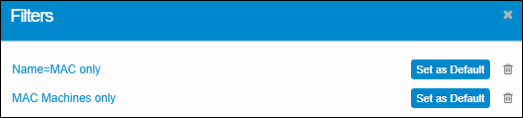
- Click the Saved Filter icon on the toolbar to open the Filters list.
- Select a filter to apply it to your data.
- (Optional) Click Set as Default to make it load automatically.
- To remove a saved filter, click its Delete icon.