Maintenance
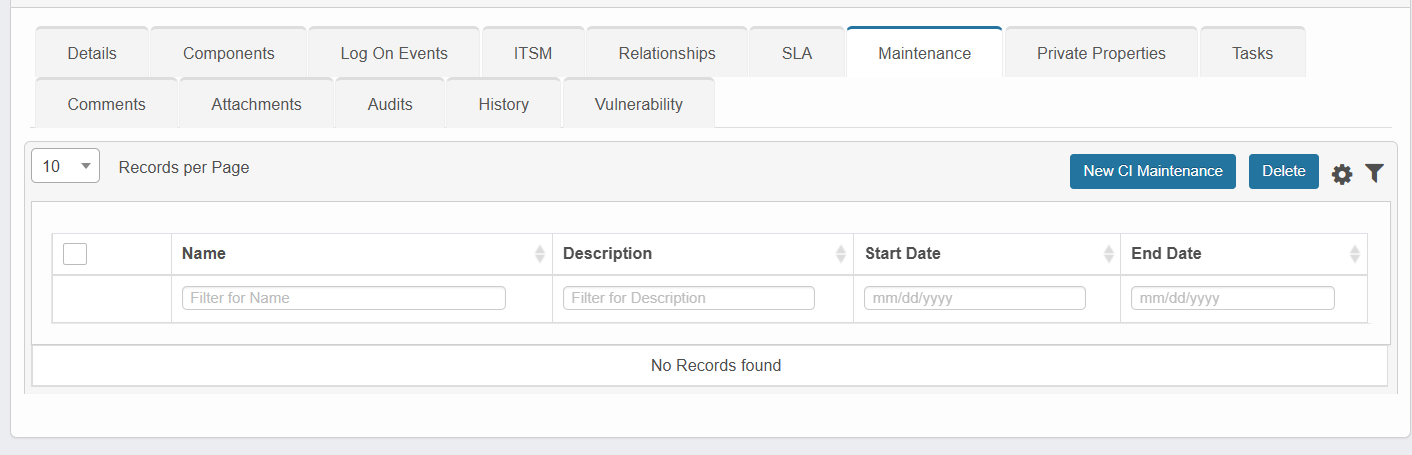
The Maintenance tab allows users to schedule, configure, and manage maintenance windows for CIs, ensuring operations such as reboot, shutdown, or patching do not disrupt regular monitoring or trigger false alarms.
-
Click on New CI Maintenance to create a new maintenance for the CI.
-
The system will display the Add Maintenance window. Enter the required maintenance information, then click Add to save the maintenance.
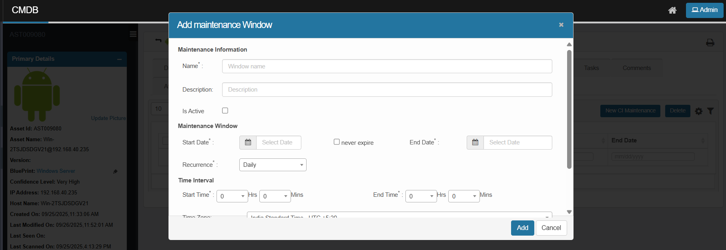
Add Maintenance Window:
|
Field |
Description |
|
Name |
Name/label for the maintenance window |
|
Description |
Notes or purpose of the scheduled maintenance |
|
Is Active |
A checkbox to mark the window as active |
|
Start Date |
Beginning date of the maintenance window |
|
End Date |
Ending date (can be left blank if “Never Expire” is selected) |
|
Never Expire |
If checked, the maintenance continues until manually ended |
|
Recurrence |
Frequency (e.g., Daily, Weekly) |
|
Start Time |
Start time for the maintenance of each cycle |
|
End Time |
End time for the maintenance of each cycle |
|
Time Zone |
The relevant time zone for the maintenance scheduling |
|
Select Client |
The client to associate with the maintenance |
Use case: Properly configuring maintenance windows ensures that automated processes, scans, and monitoring systems exclude known downtime periods, maintaining data accuracy and alert integrity.