Change attributes
The Change Attributes action in the Virima CMDB enables users to update one or more field values across selected Configuration Items (CIs) in bulk.
-
Select one or more blueprints.
-
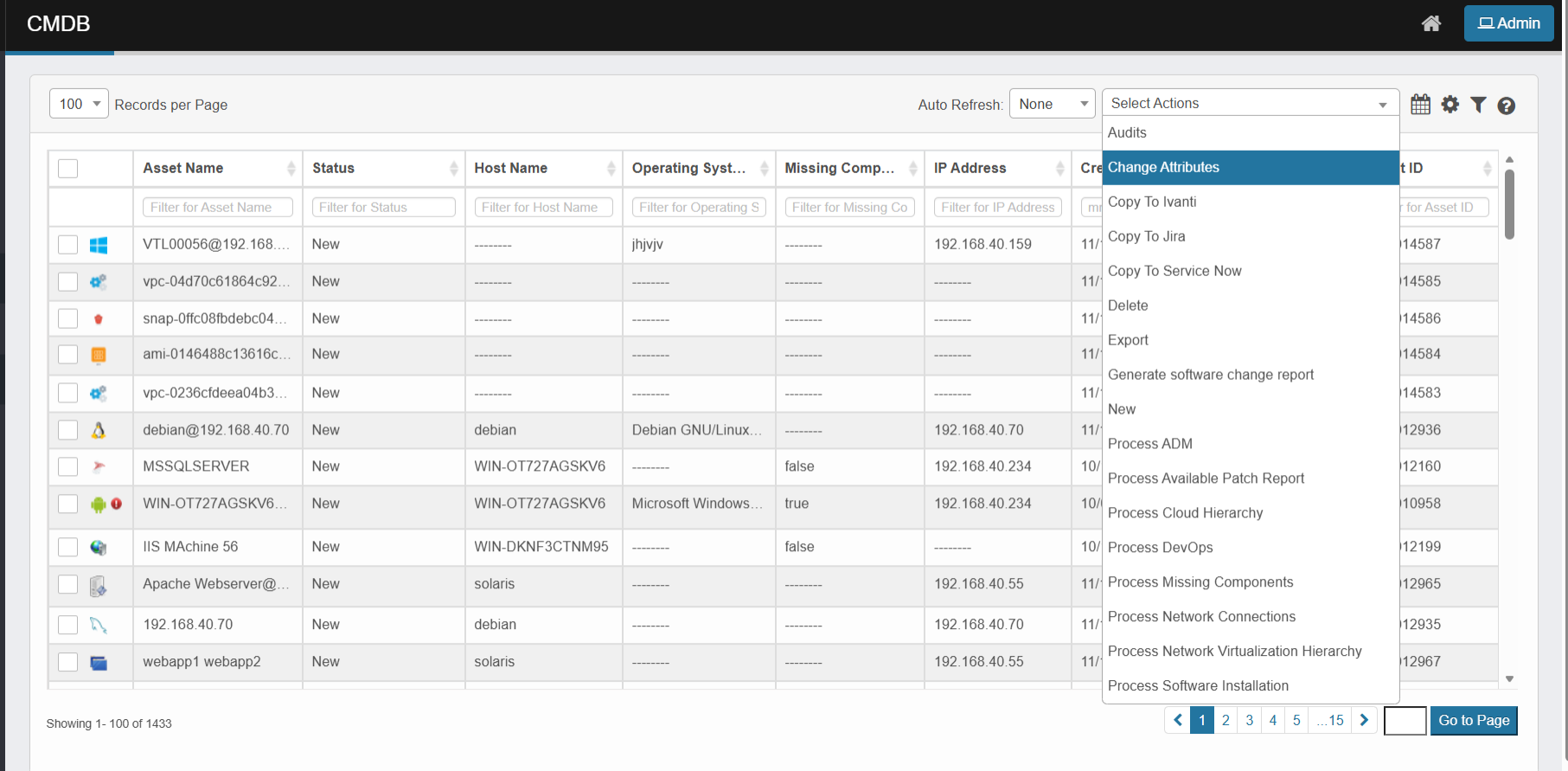
Click the Select Actions dropdown at the top-right of the CMDB list.
-
Choose Change Attributes from the dropdown.
-
After selecting blueprints and triggering the Change Attribute action, a confirmation prompt appears.
-
Click "Yes" to proceed or "No" to cancel. A screen then displays all editable fields, grouped by category.
-
Editable fields are grouped by category based on the blueprint example (with a detailed list of categories and example fields).
-
Properties common to all blueprints, if edited, are reflected in all CIs associated with the selected blueprints.
-
Properties specific to a particular blueprint, if edited, are reflected only in CIs associated with that blueprint.
Modify CI Properties
The Change Attributes form is organized into the following sections:
The following fields may appear (depending on CI type, user role, and blueprint design) and can be edited in bulk:
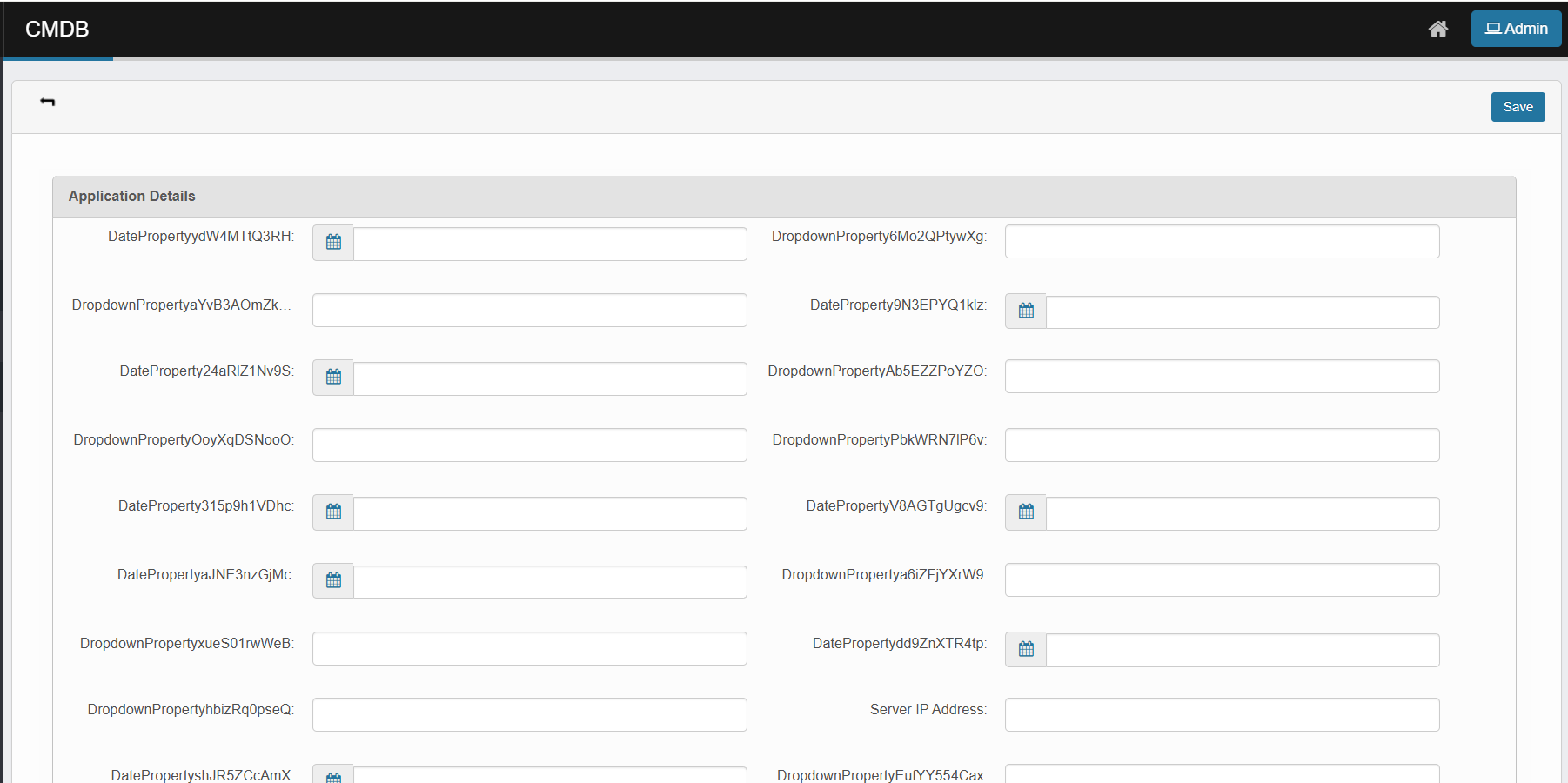
Application Details
-
Date Properties: Various date fields with calendar pickers
-
Dropdown Properties: Configurable dropdown selections
-
Custom Fields: Application-specific properties
Asset Primary Information
-
Manufacturer: Asset manufacturer details
-
Asset Name: Descriptive name for the asset
-
Subscription ID: Unique subscription identifier
-
Server Port: Network port information
-
Condition: Asset condition (Normal, etc.)
-
Business Criticality: Impact level (High, Medium, Low)
-
Type: Asset categorization
-
Description: Detailed asset description
-
Model Number: Manufacturer model identifier
-
Serial Number: Unique serial identifier
-
Resource Group: Organizational grouping
-
Company: Associated company/organization
-
Local FQDN: Fully qualified domain name
-
Host Name: Network host identifier
-
Contracts: Associated contract information
-
TestToDelete: Testing/validation fields
Device Details
-
Device Location: Physical/logical location
-
Hardware Type: Device classification
Hardware and Network
-
IP Address: Primary IP configuration
-
Virtual IP Address: Virtual network addressing
-
Uptime: System uptime information
-
Domain: Network domain membership
-
Network Properties: Various network-related integer and string properties
-
Boolean Properties: Network configuration flags
Maintenance and Backup Information
-
Backup Configurations: Dropdown selections for backup settings
-
Maintenance Schedules: Maintenance-related properties
Network Adapter Details
-
MAC Address: Physical network adapter address
-
Default Gateway: Network gateway configuration
Operating System Details
-
Operating System: OS identification
-
OS Build Number: Specific build information
-
OS Architecture: System architecture (32-bit/64-bit)
-
OS Kernel: Kernel version information
Processor Details
-
Number of Processors: CPU count information
Software Instance Details
-
Build Version: Software build information
-
Display Version: User-visible version strings
Virtual Machine Details
-
UUID: Unique virtual machine identifier
Other Information
-
Owner: Asset owner assignment with "Add" button
-
Second Level Support: Support contact with "Add" button
-
Third Level Support: Escalation contact with "Add" button
-
Tags: Asset categorization tags with "Add" button
-
Location: Physical/logical location with "Add" button
-
Hardware Asset: Associated hardware with "Add" button
-
OS License Key: Operating system licensing with "Add" button
-
Vendor: Manufacturer/vendor information with "Add" button
Contacts
-
Contact Management: Add/manage CI-related contacts with "Add" button
After configuring property values, click "Save"
Changes apply to all selected CIs. You will then return to the main CMDB view.
Verify changes: Confirm updated properties reflect in CI records. Open specific CIs to confirm detailed changes