View Resources
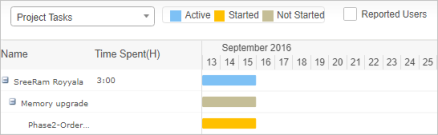
Use this function to view details for a user such as tasks performed, hours spent on the task, status of a task (such as Active, Started, and Not Started), and dates on which tasks occurred.
|
1.
|
In the main window, select Admin > Users > Users. The Access Management window displays. |
|
2.
|
From the Select Actions drop-down list, choose View Resources. A new window opens and provides the relevant details. |
|
3.
|
To toggle between Projects and Miscellaneous Task, use the drop-down list. |
|
4.
|
To view users who have reported, click Reported Users. |
|
5.
|
To close the window, click the X in the right upper corner of the window. |