New BSM View
| 1. | In the main window, select Admin > SACM > BSM View. The BSM View window displays. |

| 2. | From the Select Actions drop-down list, choose New BSM View. The BSM View window displays. |
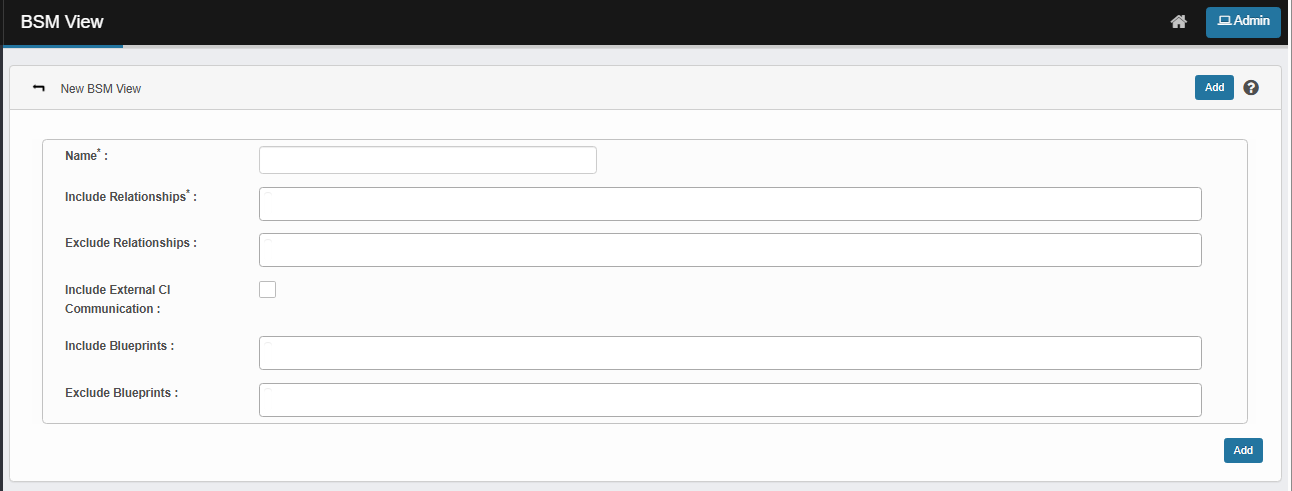
| 3. | Enter a Name for the BSM view. |
| 4. | From the Include Relationships and Include Bluerpints drop-down lists, select the type of required relationship and blueprint. |
| 5. | From the Exclude Relationships and Exclude Blueprints drop-down lists, select the type of relationship and blueprint to be omitted. |
| 6. | Check Include External CI Communication option to include external communications to the corresponding CI. |
| 7. | When all selections/entries are made, click Add. |