Problem Model
Use this function to configure and populate information that can be re used for defining change requests. It can be used to define commonly occurring changes raised by Service Desk Members to skip and reduce the time required to fill in forms.
|
The model created first is considered the "default" model.
A model cannot be deleted. If it is being used, an alert message displays onscreen.
The Resolution Information and Closure Information sections can be edited only in their respective states.
The value of attributes in the model can be changed even if they are used by another change.
|
In the main window, click Admin > Problem Management > Problem Model. The Problem Model window displays.
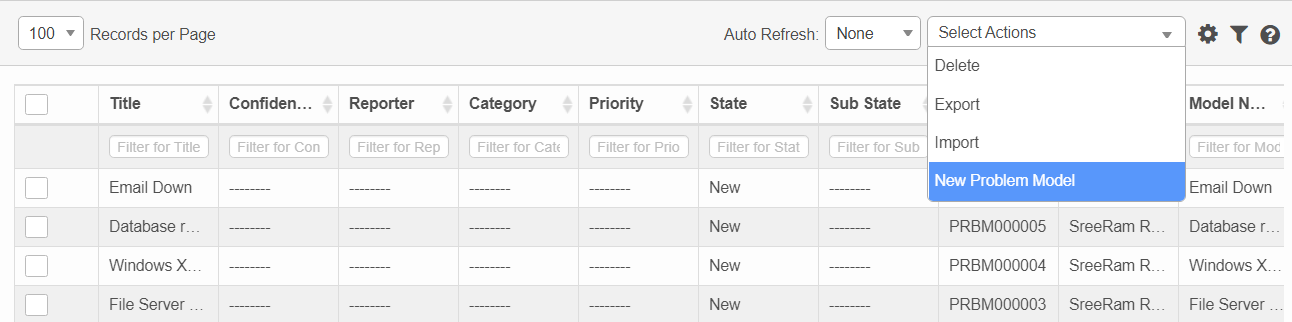

 New Problem Model
| 1. | Complete the fields, referring to the topic, Management Model Sections and Fields. |
| 2. | When all required selections/entries are made, click Add. |
Modify Properties
| 1. | In the Details window, from the Select Actions drop-down list, select Modify Properties. |
| 2. | Next to the section in which a change should be made, click Edit Properties. The Update Properties dialog box displays. |
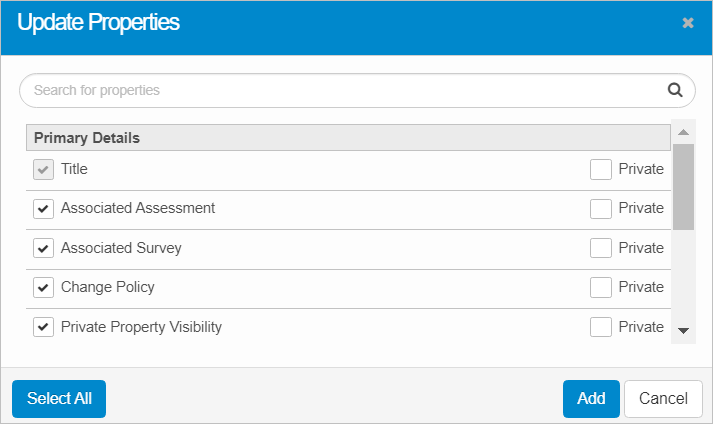
| 3. | When all selections/entries are made, click Add. |
| When you remove a property, a red X displays next to that property when viewing the Details. |
Select Existing Property
To select an existing property, enter the criteria in the Search field. As you enter a character, the corresponding properties that match the criteria display. Click to select the property so a check mark is shown.
To select all properties, click Select All.
Unselect Existing Property
To unselect an existing property, enter the criteria in the Search field. As you enter a character, the corresponding properties that match the criteria display. Click to unselect the property so no check mark is shown.
| The Select All option is not applicable when deselecting properties. |
Add New Property
| 1. | Click Add New Property. |
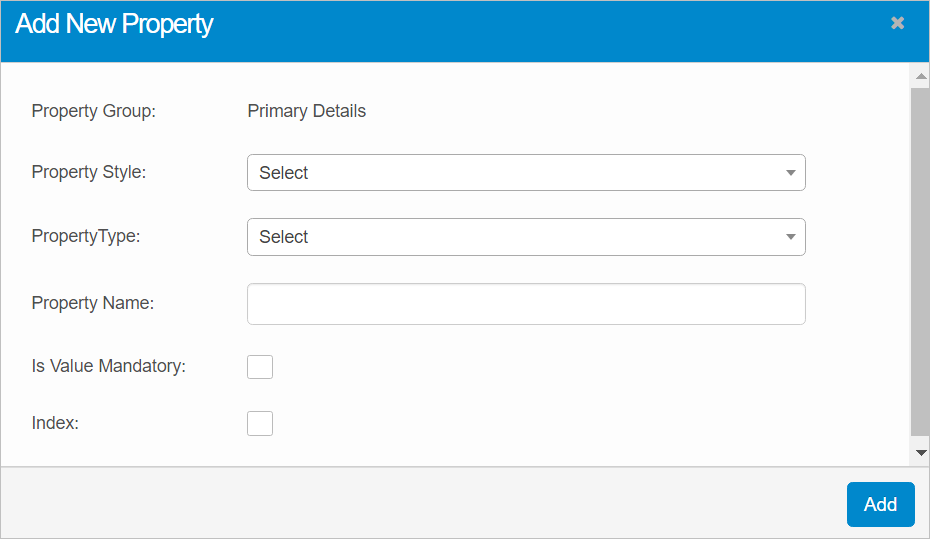
| 2. | Click the drop-down lists and select the Property Style and Property Types. |
| 3. | Enter a Property Name. |
| 4. | If the property is required, select Is Mandatory. |
| 5. | If the property should be indexed, select Index. |
| 6. | When all selections/entries are made, click Add. Upon returning the details, the newly added property is shown with a red X. To remove the property, click the red X. Otherwise, click Save and the X is removed. |
 Edit Problem Model
| Not all functions include an option to edit record line items shown in the main window. |
| 1. | Navigate to the window containing the record to edit. |
| 2. | Click the line containing the record. The applicable window or dialog box displays. |
| 3. | Make the necessary modifications. |
| 4. | Click Save or Add, as applicable. |
Delete Problem Model
| Deleting is a permanent action and cannot be undone. Deleting may affect other functionality and information in the application such as data in configured reports, fields in windows, selectable options, etc. Therefore, be sure to understand the potential effects before making a deletion. |
| 1. | Click the line that contains the item to delete. |
| 2. | From the Select Actions drop-down list, choose Delete. If a confirmation message is displayed, type Delete and click Deleteto confirm. |
Other Functions and Page Elements