SLA: Details
|
1.
|
In the Service Level Agreement window, from the Select Actions drop-down list, choose New. |
|
2.
|
Select an existing record. A new window displays with the Details tab displayed, by default. |
| |
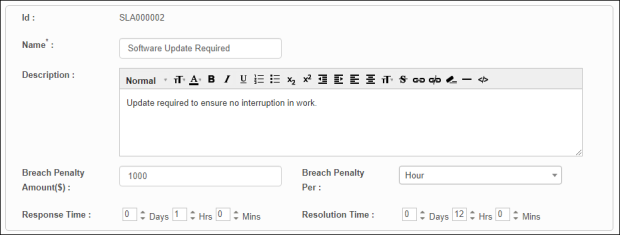
By default, the Id has already been created and cannot be changed. |
|
3.
|
In the Name field, enter a name to identify this SLA. |
|
4.
|
In the Description field, enter a description for this SLA. |
|
5.
|
In the Breach Penalty Amount ($) field, type the dollar amount that will be accrued should the SLA agreement is breached. |
|
6.
|
In the Breach Penalty Per field, type the duration at which point the penalty amount is accrued. |
|
7.
|
In the Response Time field, enter the days/hours/minutes that must be maintained before the penalty applies. |
|
8.
|
In the Resolution Time field, enter the days/hours/minutes that must be maintained before the penalty applies. |
|
9.
|
When all selections/entries are made, click Save. |
Related Topics
About Service Level Agreements