Inbox Configuration for ITSM Ticket Management
Use this function to configure mail server to receive email messages sent by the users by configuring relevant Email server protocols.
In the main window, click Admin > Others > Inbox Configuration ITSM Ticket Management. The Inbox ITSM Configuration dialog box displays.
In the main window, click the gear icon and select Inbox Configuration ITSM Ticket Management.
NEED ICON
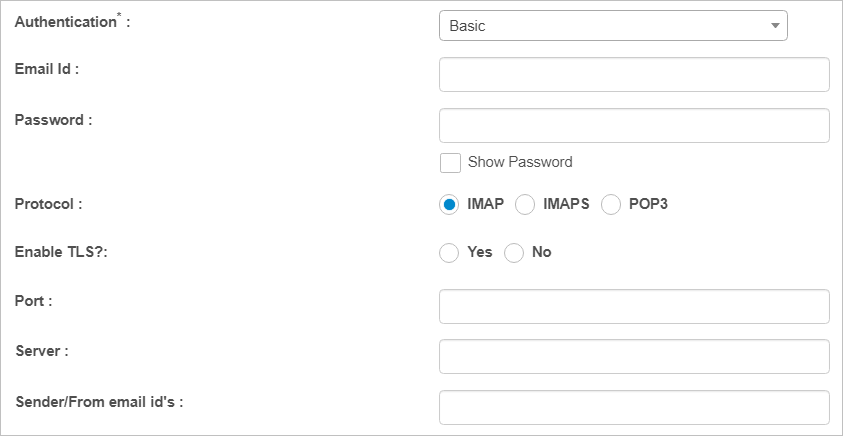
The Inbox ITSM Configuration dialog box displays.
NEED IMAGE

 New Inbox Configuration
| 1. | Complete the fields, referring to the table below. |
| 2. | When all selections/entries are made, click Add. |
Inbox ITSM Configuration Fields
| Field | Description |
|---|---|
|
Authentication |
Select an authentication type from the drop-down list. |
| Email ID | Enter the email ID of the receiver. |
| Password | Enter corresponding password for the Email ID. Click Show Password to view the entered password. |
|
Protocol |
Select the required/existing protocol. Options include IMAP, IMPS and POP3. |
|
Enable TLS Parameter |
Select Yes or No. |
|
Port |
Enter the number assigned to the protocol. |
|
Server |
Enter the IP address of the email server. |
|
Sender/From Email ID |
Enter the email ID of the sender. |
|
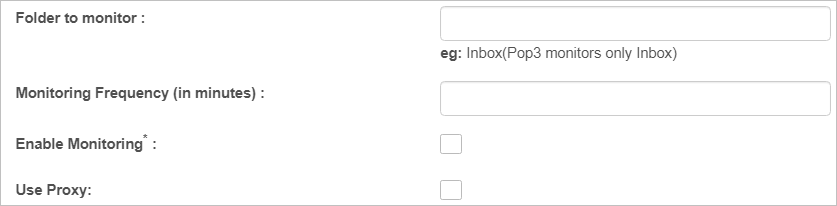
Folder to Monitor |
Enter the name of the folders present in the Email application to be monitored. |
| Monitoring Frequency in Minutes | Enter the frequency in minutes that the email should be monitored. |
|
Enable Monitoring |
When selected, begins the folder monitoring process. |
|
Use Proxy |
When selected, uses a proxy server. Enter the Host, Username, Password, and Port. |
Edit Inbox Configuration
| Not all functions include an option to edit record line items shown in the main window. |
| 1. | Navigate to the window containing the record to edit. |
| 2. | Click the line containing the record. The applicable window or dialog box displays. |
| 3. | Make the necessary modifications. |
| 4. | Click Save or Add, as applicable. |
Delete Inbox Configuration
| Deleting is a permanent action and cannot be undone. Deleting may affect other functionality and information in the application such as data in configured reports, fields in windows, selectable options, etc. Therefore, be sure to understand the potential effects before making a deletion. |
| 1. | Click the line that contains the item to delete. |
| 2. | From the Select Actions drop-down list, choose Delete. If a confirmation message is displayed, type Delete and click Deleteto confirm. |
Other Functions and Page Elements