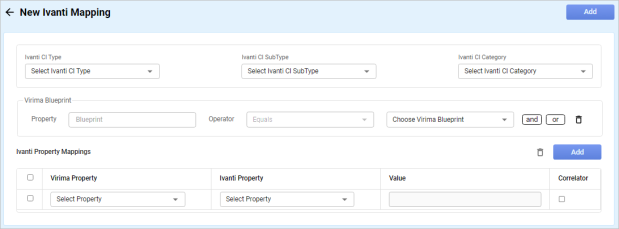
New Ivanti Mappings
Use this function to enter the details for mapping properties between Virima and Ivanti.
|
1.
|
In the main window, click the gear icon and select Integrations > Ivanti Mappings. |
The Ivanti Mappings window displays.
|
2.
|
To create a new mapping, click New Mapping. The New Ivanti Mapping window displays. |
|
3.
|
Click the drop-down lists and select the Ivanti CI Type, CI SubType and CI Category. |
|
4.
|
Under Virima Blueprint, do the following: |
|
a.
|
Select the Property, Operator, and Value. |
|
b.
|
Select the type of condition (and, or). |
|
c.
|
Select the Property, Operator, and Value. |
|
d.
|
To delete a condition line, click the trashcan icon. |
|
5.
|
Under Ivanti Properties, do the following: |
|
a.
|
Click the Add button. A new line displays. |
|
b.
|
In the Virima Property field, click the drop-down list and select an existing property. |
|
c.
|
In the Ivanti Property field, click the drop-down list and select an existing property. |
|
d.
|
In the Value field, enter the value to associate with the property. |
|
e.
|
To use a correlator, check Correlator. |
|
f.
|
To delete an item, select the property line and click the trashcan icon. |
Other Functions and Page Elements