Discovery Scan Workflow
This content is currently under development.
2/14/22: Per Balaji, this entire topic needs to be rewritten. This task is assigned to his team.
When a scan is triggered, the host type of a machine is determined from ports rank/priority as configured under Host Configuration. Prioritizing/Ranking of ports. This determination is based on the organization's infrastructure as some organizations might have more Windows machines, than Linux and Network devices. In order to make scanning much faster, the ports are prioritized.
The Discovery application checks to see if the highest ranked/prioritized port 135 is opened (see Workflow diagram below).
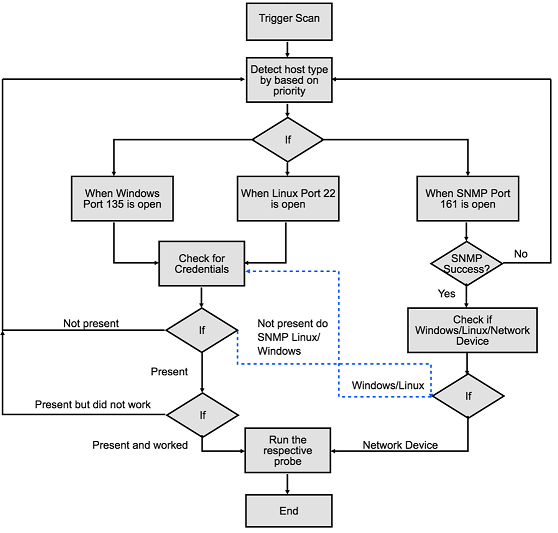
When the port is opened, it checks for the matching credentials.
Next, the Discovery application looks as if the next ranked/prioritized port 22 is opened.
Finally, the Discovery application looks as if the last port 161 is opened.
If SNMP is successful, then it will determine the host as Network Device and will collect the device information.
For example, if port 161 has the highest rank/priority and SNMP is a success then it will double-check for Windows/Linux credentials. In this scenario, since it already checked for ports 135 and 22, it won’t check for Windows/Linux credentials.
Suppose, SNMP check fails then it will display the Unknown Host message.
IS THERE SOMETHING AFTER THIS?