Custom Patterns
The custom patterns provide the capability to add more known applications by providing Command and Arguments Details.
| 1. | In the main window, select Admin > Discovery > Custom Patterns. The Patterns window displays. |

| 2. | In the Select Actions drop-down list, choose an action: New Pattern, Delete or Export. |
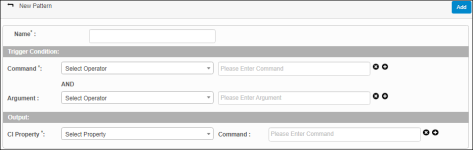
| 3. | In the Name field, type a name for the pattern. |
| 4. | Under Trigger Conditions, in the Command and Argument fields, do any of the following: |
Click the Select Operator drop-down list and choose the applicable operator.
In the Present Enter [Command or Argument] field, enter the corresponding command or argument.
To delete a command or argument, click the X.
To add a command or argument, click the plus + sign.
| 5. | Under Output, do the following: |
In the CI Property field, click the drop-down list and choose the applicable property.
In the Command field, enter the corresponding command.
To delete a CI Property, click the X.
To add a CI property, click the plus + sign.
| 6. | When all selections/entries are made, click Add. |
Edit Custom Patterns
| Not all functions include an option to edit record line items shown in the main window. |
| 1. | Navigate to the window containing the record to edit. |
| 2. | Click the line containing the record. The applicable window or dialog box displays. |
| 3. | Make the necessary modifications. |
| 4. | Click Save or Add, as applicable. |
Other Functions and Page Elements