Change Risk Assessments
Risk Assessment provides a flexible way to capture information from the Assignee in order to derive the risk of the associated change. Libraries of questions can be used to derive the risk of a change based on criteria contained within the change. For example, a different set of questions could be set for a hardware change versus a software change.
The assessment uses a weighted score approach for each question. The overall score for an assessment is evaluated against thresholds to determine the risk of a change.
In the main window, click the gear icon and select Change Management > Risk Assessments.
NEED ICON
The Risk Assessments window displays.


 Edit Risk Assessment
| |
Not all functions include an option to edit record line items shown in the main window. |
|
1.
|
Navigate to the window containing the record to edit. |
|
2.
|
Click the line containing the record. The applicable window or dialog box displays. |
|
3.
|
Make the necessary modifications. |
|
4.
|
Click Save or Add, as applicable. |
|
5.
|
Complete the other tabs, referring to the sections below. |
Related Software
SHOULD NOT BE SHOWING. New image.
Risk Assessment Criteria
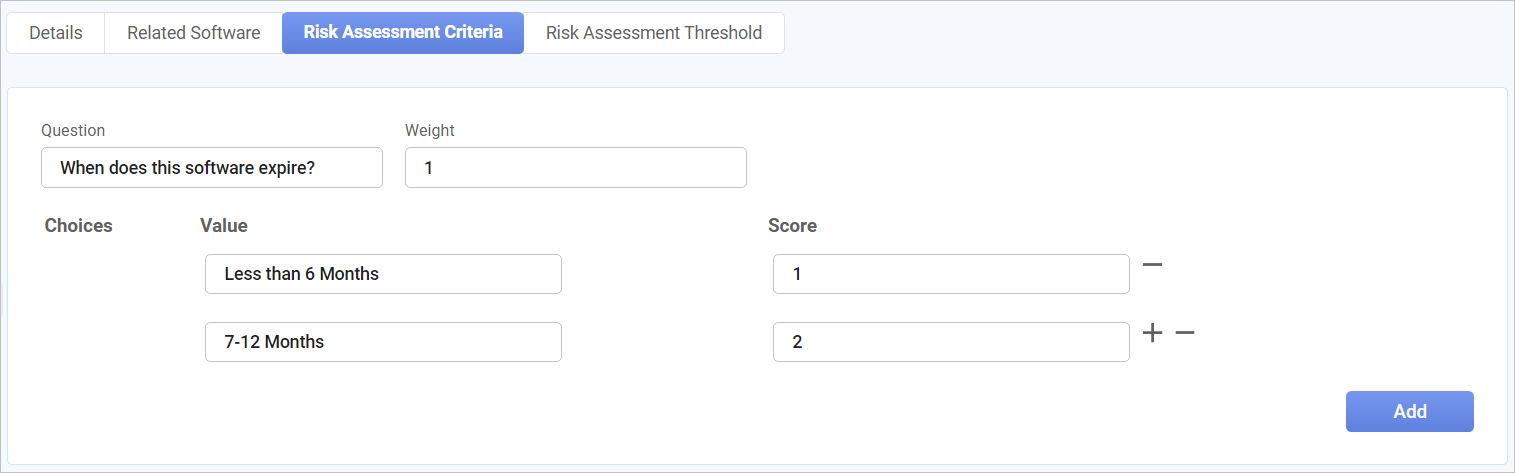
Use this function to create risk related questions to assess its criteria.
|
1.
|
Click Risk Assessment Criteria. |
|
2.
|
Click New Assessment Question. |
|
3.
|
In the Question field, enter the risk-related question. |
|
4.
|
In the Weight field, enter a number for this question. |
|
5.
|
Enter a Value and assign a Score. |
|
-
|
Click the plus + sign to add a new choice. |
|
-
|
Click the minus - sign to remove a choice. |
Risk Assessment Threshold
Use this function to configure a threshold value for the Risk Severity- High, Low,and Medium
|
1.
|
Click Risk Assessment Threshold. |
|
2.
|
Click New Assessment Threshold. |
|
3.
|
In the Risk field, click the drop-down list and select the applicable risk. |
|
4.
|
In the Score greater than field, enter the threshold value. |
Delete Risk Assessment
| |
Deleting is a permanent action and cannot be undone. Deleting may affect other functionality and information in the application such as data in configured reports, fields in windows, selectable options, etc. Therefore, be sure to understand the potential effects before making a deletion. |
|
1.
|
Click the line that contains the item to delete. |
|
2.
|
From the Select Actions drop-down list, choose Delete. If a confirmation message is displayed, type Delete and click Deleteto confirm. |
Other Functions and Page Elements